

In this guide: Location of the plugin panel and summary of its main sections.
Contents
- Panel location
- What you will find in the panel
- Common sections
- Recommended use
Panel location
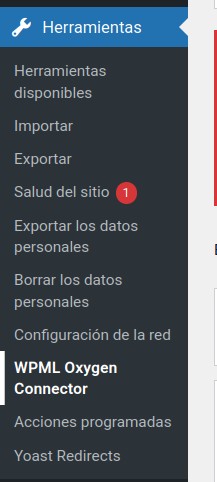
The main plugin panel is in the WordPress dashboard, under Tools → WPML Oxygen Connector.
You need to access it with a user who has administrator permissions to see and use the main actions.
What you will find in the panel
The panel brings together the tools needed to work with Oxygen and WPML translations from a dedicated interface.
Depending on the installed version and your website configuration, you may find sections for detected pages, scanning, string editing, export/import, validation, cache, license, and support.
Common sections
- Detected Oxygen pages: list of detected Oxygen content.
- View strings: screen to review and translate texts from a page.
- Export translations: export of translatable texts in JSON.
- Import translations: import of reviewed translations.
- Validation: review of the translation status.
- Cache: cache regeneration when necessary.
- License: license activation and review.
- Support data export: support data export for specific cases.
Recommended use
For a basic workflow, always start with one page: scan it, open its strings, translate, save, and review the frontend.
When you master that workflow, you can use JSON export/import or global scans to move faster.