

In this guide: Interpretation of translation statuses in the plugin panel.
Contents
- Why statuses exist
- Common statuses
- How to act depending on the status
- Important
Why statuses exist
The plugin panel shows statuses to help you know whether a page needs scanning, translation, or review.
These statuses are a work guide. They help you prioritize pages and detect problems before reviewing the frontend.
Common statuses
Needs scan: the page needs scanning or the catalog is not up to date.
No translatable strings: the page does not contain detected translatable texts.
Not translated: strings have been detected, but there are no useful translations in the target language.
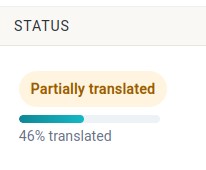
Partially translated: some strings are translated and others are still pending.
Fully translated: all detected strings have a valid translation.
Has orphan strings: old strings may exist that are no longer in the current structure.
How to act depending on the status
If Needs scan appears, run a page scan.
If Partially translated appears, open View strings and filter by pending items.
If orphan strings appear, scan again or use the available cleanup tools.
If Fully translated appears, still review the frontend before considering the page finished.
Important
A page may be fully translated from the string point of view and still need visual review. Texts may be longer in another language, affect buttons, or require style adjustments in Oxygen.